Today we used green screens for the first time and experimented with the footage we recorded in Premiere Pro. We found it fairly okay to work with the green screen, however it took some time before a few students recorded some footage that we could use.
In Premiere Pro, it was easy to remove the green screen, but it was quite difficult adjusting the options as when we removed the green screen, the person in front turned a different colour, such as pink. What we did to remove the green screen was, select the footage in the bottom right part of the screen where you cut and move the bars of footage, then in the box in the bottom left part of the screen there is a tab that is called 'effects'. You could either look in the folder named, 'Video Effects' -> 'Keying' and then drag 'Ultra Key' onto the footage in 'Video 2'.
For example here, the green screen behind the students is present. To remove it, I dragged 'Ultra Key' onto the video footage and in the box beside the green screen, there is a selection of options and I chose the option where you can select the green behind the students and once you do, the green screen disappears and it will end up looking like the image below. As I said before, the colour of the students has changed to a mixture of pink, red, silver and green.
In the image below are numerous options where you can change the colour of the image such as:
Matte Generation
Matte Cleanup
Spill Suppression
and Colour Correction.
And in these options are separate options such as in 'Matte Generation' you have the options to change the:
Transparency
Highlight
Shadow
Tolerance
and Pedestal
And this section is the part of premiere pro where you can view the footage you're editing. You have the option to pause, play, forward, rewind, to back to the beginning or go straight to the end.
Matt Lucas Matthew Richard Lucas, born March 5th 1974, Paddington, is an English comedian, actor, screenwriter and singer in which is known for his work with David Walliams in the TV show 'Little Britain'. He also played Tweedle Dum and Tweedle Dee in Alice in Wonderland (2010) and the sequel, Alice Through the Looking Glass (2016) both produced by Tim Burton, Bridesmaids (2011) and Shaun of the Dead (2004). Matt Lucas' career began in 1995 when he appeared on the show, 'The Smell of Reeves and Mortimer and then went onto another show called 'Shooting Stars' which is a British TV comedy panel game, broadcast on BBC 2 and hosted by Vic Reeves and Bob Mortimer. As a child, Matt Lucas wanted to be a drama teacher, then he wanted to work in a children's foster home, then a painter/decorator as he was a fan of art and that's when he moved on to theatre. Lucas said that even though school was tough for him, he felt relaxed, in control and at home when he was performing on stage. Scenes from 'Little Britain':
He suffers from Alopecia Universalis (causes rapid hair loss including the eyelashes and eyebrows), and lost all his hair at 6 years of age. At school, he played a character called Accrington Stanley in the school's play, The Roman Invasion of Ramsbottom. This then went on to be shown at the Edinbough Festival in which landed him a place in the West End at the age of 14. By the age of 19, Lucas auditioned for the 'National Youth Music Theatre' where he met his future TV partner, David Walliams. Later on, he was best man at David Walliams and his wife, Lara Stone's wedding in 2010. Matt Lucas has also been listed number 9 for the most influential gay men and women in the UK public sphere, where he was number 16 in the previous year. He studied drama at Bristol university, until he dropped out due to being offered parts in TV shows while studying drama at uni. This was at the time Little Britain was created and became a huge success.
I quote I found on IMDB stated that he liked the 1986 TV show, Pingu because he liked 'the way they used gibberish' and I believe this is how he gathered his inspiration for the TV show, Pompidou (2015) which only has one season released and there has been no further notice as to whether another season is going to be recorded.
So far, for primary research, we have had a presentation from James Clarke, the creator of 'Worksop's Got Talent' (http://www.worksopsgottalent.co.uk/index.php) where he spoke to the class about his condition, why he decided to do WGT, how much he is planning to raise, what he would like to include in the music video we are to create using the song Nickelback 'Rockstar', who he would like to be involved in the music video and the prizes he is to give out to people who buy tickets to see WGT.
Another way I have carried out primary research is by using a
Panasonic AG-HMC151E and learning how to operate it. I have obtained a number of basic skills which I put into practise such as:
Attaching a battery to the video camera
Powering the video camera on and off
Inserting the SD card media into the camera
and using the pull-out screen and adjusting the viewfinder to view the image.
I also created a blog on the three stages of production, so the research I carried out allowed me to understand what professionals have to go through. I created another blog about green screens and how we used premiere pro in the post-production to remove the green screen in the footage we recored and replacing it with either an image or a video.
The group made further developments on the music video by making a table that students and teachers can fill out if they want to participate in the music video. We have also decided to film the whole music video on the green screen in the TV studio in college as this way we have more chance of having creative backgrounds that link to the lyrics in 'Rockstar' as we don't have anything such as mansions in Worksop, unfortunately. We also created business cards which we could give to staff and students in case they needed to rearrange their appointment for the recording of the music video, or cancel if they're not able to make any of the slots. A google document was created for the group to update information to such as:
How long each line is
The lyrics, split up into lines
Who is going to be doing that line
Whether any props are needed
And any other additional notes
13/10/16
We have now almost completed the filming for the 'Rockstar' music video, we just have a couple more people to film this afternoon and that is the final time we are going to be filming any footage. Some students and staff and backed out, but the people that we have recorded, brought in props such as wigs, shutter glasses, hats, sunglasses, cigarette suits and a banana suit. For the people that didn't have any props, they improvised with dancing and mimed as well.
Secondary Research
I took inspiration from the music video, 'Nothin' On You' by B.o.B and Bruno Mars and the idea to use still images of students and teachers and then use certain people to mime the lyrics. As fro the background their is a still image of buildings and signs only we would take pictures of the college and import them onto a green screen. This idea came to me when the year 1's were discussing the lyrics for 'Rockstar' by Nickelback with our teacher. I mentioned my idea and then proceeded to show the music video to the group, and the feedback I received was positive as they thought that using the 'Nothin' On You' music video as inspiration is a good idea.
The group watched a number of Michael Jackson music videos, such as the music videos where the videos are filmed as short films and they have a form of narrative. For example:
We found Michael Jackson's short film styled music videos interesting as they involved a narrative and a lot of thought was put into the costumes, setting/location, the props and the post-production effects.
Comparing Research Tools
From the primary and secondary research I have carried out I believe the primary research benefited me the most as I had the chance to test out the green screen and a professional camera at first hand. Trying things out for myself was better than researching it through secondary research as I found I remembered the information quickly and easily.
So far, for primary research, we have had a presentation from James Clarke, the creator of 'Worksop's Got Talent' (http://www.worksopsgottalent.co.uk/index.php) where he spoke to the class about his condition, why he decided to do WGT, how much he is planning to raise, what he would like to include in the music video we are to create using the song Nickelback 'Rockstar', who he would like to be involved in the music video and the prizes he is to give out to people who buy tickets to see WGT.
Another way I have carried out primary research is by using a
Panasonic AG-HMC151E and learning how to operate it. I have obtained a number of basic skills which I put into practise such as:
Attaching a battery to the video camera
Powering the video camera on and off
Inserting the SD card media into the camera
and using the pull-out screen and adjusting the viewfinder to view the image.
I also created a blog on the three stages of production, so the research I carried out allowed me to understand what professionals have to go through. I created another blog about green screens and how we used premiere pro in the post-production to remove the green screen in the footage we recored and replacing it with either an image or a video.
The group made further developments on the music video by making a table that students and teachers can fill out if they want to participate in the music video. We have also decided to film the whole music video on the green screen in the TV studio in college as this way we have more chance of having creative backgrounds that link to the lyrics in 'Rockstar' as we don't have anything such as mansions in Worksop, unfortunately. We also created business cards which we could give to staff and students in case they needed to rearrange their appointment for the recording of the music video, or cancel if they're not able to make any of the slots. A google document was created for the group to update information to such as:
How long each line is
The lyrics, split up into lines
Who is going to be doing that line
Whether any props are needed
And any other additional notes
13/10/16
We have now almost completed the filming for the 'Rockstar' music video, we just have a couple more people to film this afternoon and that is the final time we are going to be filming any footage. Some students and staff and backed out, but the people that we have recorded, brought in props such as wigs, shutter glasses, hats, sunglasses, cigarette suits and a banana suit. For the people that didn't have any props, they improvised with dancing and mimed as well.
Secondary Research
I took inspiration from the music video, 'Nothin' On You' by B.o.B and Bruno Mars and the idea to use still images of students and teachers and then use certain people to mime the lyrics. As fro the background their is a still image of buildings and signs only we would take pictures of the college and import them onto a green screen. This idea came to me when the year 1's were discussing the lyrics for 'Rockstar' by Nickelback with our teacher. I mentioned my idea and then proceeded to show the music video to the group, and the feedback I received was positive as they thought that using the 'Nothin' On You' music video as inspiration is a good idea.
The group watched a number of Michael Jackson music videos, such as the music videos where the videos are filmed as short films and they have a form of narrative. For example:
We found Michael Jackson's short film styled music videos interesting as they involved a narrative and a lot of thought was put into the costumes, setting/location, the props and the post-production effects.
Comparing Research Tools
From the primary and secondary research I have carried out I believe the primary research benefited me the most as I had the chance to test out the green screen and a professional camera at first hand. Trying things out for myself was better than researching it through secondary research as I found I remembered the information quickly and easily.
Similarly to the skills I need, I'll develop my knowledge of cameras, editing/post-production, how green screens work and how to use props effectively by researching about them and using the supplies around college.
XLS's are used for setting, or establishing the scene and to allow the audience to comprehend landscapes. This shot is also used in big budget films where landmarks such as the Hollywood is presented.
Long Shot (LS)
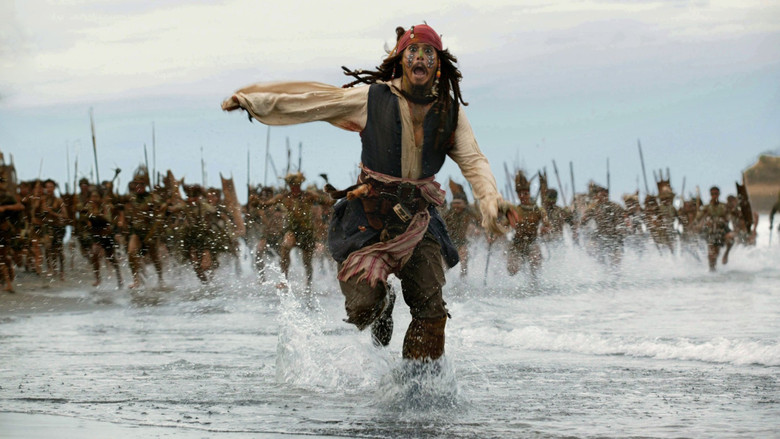
LS's are used to introduce a character and the setting they're in. A long shot could possibly let the audience discover the genre of the media form from the characters dress code, make-up, props, the setting in which the character is in, and the characters action codes. For example, the person in the image to the left is running, suggesting that the genre of this film is action.
Medium Long Shot (MLS)
The MLS is frames the whole subject from the knees up and the shots shows the person/s in relation to the surroundings and it might also be used when there are two or three people in the shot.
Medium Shot (MS)
The MS is also known as the waist shot as it frames the person from the waist up and it also commonly used in interviews.
Medium Close Up (MCU)
The MCU frames the person's head and cuts off around mid-chest and this shots is most commonly used to show the person's facial expression, whether they are crying or smiling. This is also used in interviews and in news reports
Close Up (CU)
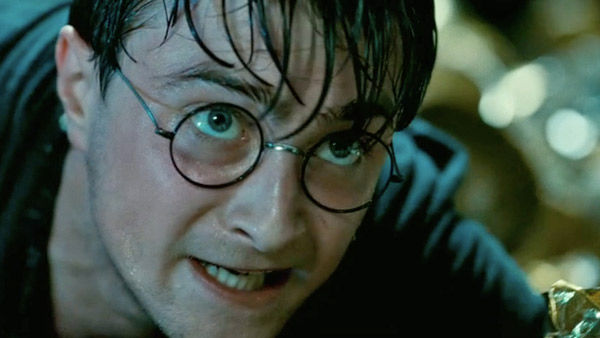
CU's frame the subjects face and cuts off mid-neck, showing the face and it shows the face and the entire head. The subject fills almost all of the frame and it captures facial expressions and emotions in great detail.
Big Close Up (BCU)
A BCU is when the camera is almost fully zoomed in on the subject's face, so facial features such as eyes, eyebrows and a small part of the nose is visible.
Extreme Close Up (ECU)
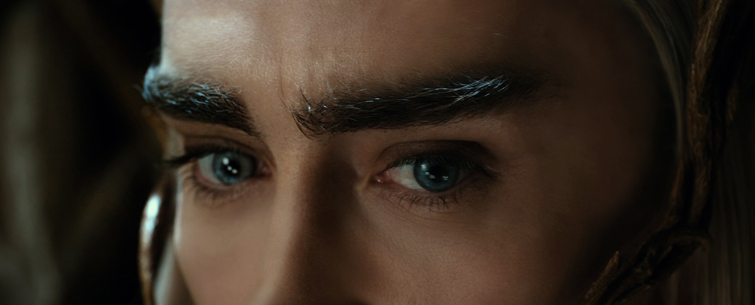
An ECU frames a certain part of the person's facial features. This shot really zooms in on something the director really wants the audience to see e.g. the subjects eyebrows furrowing, the eyes crying or the mouth smiling.
Low Angle Shot (used to make the audience feel intimidated, and to make the character look intimidating and superior over the audience)
High Angle Shot (used to make the character look inferior and small and therefore placing the audience in the superior position)
Eye-Level Shot (audience is on the same level as the character/s)
Worm's Eye Shot
Canted Angle Shot
Bird's Eye View Shot
Apart from the basic camera shots there different one as seen in the video below:
We had an induction to the camera itself before we went out and recorded some footage. From that, I obtained these skills:
I can attach a battery to the video camera
I can power the video camera on and off
I can insert the SD card media into the camera
I can use the pull-out screen and adjust the viewfinder to view the image
I can switch between Manual and Full Auto mode
I can use the zoom to frame the shot
I can switch between manual and motorised zoom
I can switch between auto and manual focus and use the focus ring to focus the image
I can white balance the image to get the correct colours
I can switch between auto and manual iris
I can use the iris dial to increase or decrease the amount of light coming into the lens
I can use the neutral density filter to reduce the amount of light coming into the lens
I can start and stop recording a shot by pressing the red record button
I can switch modes to playback what I have recorded
I can hold the camera steady when using it handheld by using one hand to take the weight of the camera underneath whilst holding the camera using the wrist strap.
I can attach a camera to a tripod
I can adjust the height of a tripod
I can pan and tilt a video camera by using a tripod
This is the finder and this allows you to search for all the files that you have. The search bar is used to find a specific files that you may be looking for.
The doc can be found at the bottom of the desktop. It can hold a large number of applications that are most commonly used.
This is the launchpad and it is an extention from the doc as it gives a wider variety of applications.
To connect to skinner, go to 'Go' and then to 'Connect to Server...'
Once you have connected to the server, click connect.
Then enter the username and password to enter skinner:
name: mediastudent
password: password
Select the media file then click 'OK'.
This is the 'Skinner' shared file in which includes three other files: public, students and windows.
These are the files within the media file.
To print a word document, go to 'file' and then to 'print'. The shortcut to this would be to press command + 'P'.
Once print has been clicked, this window will appear with the details on printing. Selecte the option for the black and white printer, then click print on the bottom right hand side of the window.
This is the window that opens when 'file' and 'save as' is selected. Name the document according to the word document then press enter.
This is the information about one the the screenshots that I have taken and Command + I was selected together in order to see this information.
This is the options that appear when system preferences is selected.
Worksop's Got Talent will be raising money for a charity called 'RP Fighting Blindness'. RP stands for retinitis pigmentosa, and this is a disease within the eye in which could lead to blindness or loss of vision. RP Fighting Blindness needs to raise money so they can fund cutting edge research in order to find a cure or treatment so this charity event could highly benefit.
I had already listened to the song and seen the music video, but after I had recapped myself I feel that the simplicity of the video is what makes it so rememberable. I can see how they came up with the video as the lyrics link with the video. As this video was released in the early 2000s, technology developed a lot from the 90s, so for Nickelback to do a standard video when they could've done a lot more to make it more interesting, such as doing something so simple like changing the camera shots or angles. I also don't like the lyrics, (http://www.azlyrics.com/lyrics/nickelback/rockstar.html) particularly the lyrics in the chorus. The way he generalises that everyone wants to be a rock star and have girls and drugs come easy to them angers me. The music video and the song has received a mixture of responses, as it was awarded 'Record of the Year' in 2005 and 'Juno Award for Songwriter of the Year', in which I personally am confused about and could strongly argue against. However, what I do agree with is that 'Rockstar' received overwhelming amount of negative reviews from music critics and is considered to be one of the worst songs of all time, even though it shockingly reached number 2 in the UK and it lead to being certified Platinum. It has also sold 4.5 million copies in the United States. A lot of people and celebrities took place in the music video and it resulted in over 100 people participating. Some of the celebrities that participated were Eliza Dushku, Paul Wall, Wayne Gretzky, Gene Simmons, Dale Earnhardt, Jr., Kid Rock and Nelly Furtado.
Chad Kroeger told musicomh.com: "We had a lot of fun with that one. Just crazy nonsensical things that help paint this picture of someone dreaming about being a Rock Star. It's what you would also do if you won the lottery. I hope it comes across as us having a lot of fun and even to some degree, making fun of ourselves."
(http://www.songfacts.com/detail.php?id=9333)
Ideas:
From the presentation and discussion we have from the creator of the Worksop's Got Talent charity event, James Clarke, we decided to use the general format of the 'Rockstar' music video but embed video footage from the auditions, props that link to the lyrics and possibly involve green screen.
Using the idea for the green screen, I thought it would be interesting for teachers and students to hold a green piece of paper and while in post-production, a video from the auditions could be projected onto it, and then transition to full screen of an audition as the main purpose of the music video is to promote and to entertain. The next task I'm going to set myself is to print out the lyrics, and look at each individual line and make notes next to it about what we could record. For example, 'I'll need a credit card that's got no limit' - either a student or teacher can be filmed miming the lyrics whilst holding a credit card.
Skills needed:
In order to create this music video I'll need to develop:
my skills with a camera
editing
green screens
use of props
Creative exploration that I need to carry out:
Similarly to the skills I need, I'll develop my knowledge of cameras, editing/post-production, how green screens work and how to use props effectively by researching about them and using the supplies around college.
The camcorder that the group is going to use is the Panasonic AG-HMC151E and it earned 'Trusted Reviews' interest because it "marks another crossover between consumer and professional domains" and they believe it's "most definitely a pro-grade model"

 In Premiere Pro, it was easy to remove the green screen, but it was quite difficult adjusting the options as when we removed the green screen, the person in front turned a different colour, such as pink. What we did to remove the green screen was, select the footage in the bottom right part of the screen where you cut and move the bars of footage, then in the box in the bottom left part of the screen there is a tab that is called 'effects'. You could either look in the folder named, 'Video Effects' -> 'Keying' and then drag 'Ultra Key' onto the footage in 'Video 2'.